MemoryBrain

Your AI designs from what you save. Not from a template.

Connect your Pinterest, tell it what you like about each image, and your visual library goes with you to ChatGPT and Claude.

From a Pinterest board to your visual library.

The images stay where they are. What gets saved is what you say about them.

  1. 01

    Connect your Pinterest

    Paste a public board. One with a theme works best: websites, covers, packaging, type.

  2. 02

    It asks what you like

    Image by image. Pick what you see or say it in your own words.

  3. 03

    Your visual library

    Each reference becomes a note: what the AI sees, kept apart from what you say, plus the image link.

  4. 04

    Design from there

    When you ask for a cover or a website, your AI starts from your references.

The screen that matters

What do you like about this one?

The AI looks at the image and suggests what it has. What you pick, or what you write yourself, is what actually changes a design.

  • What you say is saved apart from what the AI describes.
  • You can skip the ones that say nothing to you.
  • No image is copied: the note keeps the link.
Visual library, most used firstTaste

20 with a why · 915 to ask · 2 skipped

✓

Sports ranking with a huge red “1”

Used 3 timeshero-numbertype-condensedcolor-mono-accentdata-table

What do you like about this one?Pick what you like and, if you want, say it in your own words: that is worth more.

Nothing to save yet. If it says nothing to you, skip.

1 to 4 pick · ⌘↵ saves · S skips

Every reference, classified. Every pattern, with its evidence.

The library sorts itself by type, platform, sector and pattern, and puts first the ones your AI uses most. When several share a mechanism, a pattern comes out with its evidence.

All 939UI 904Photography 1Unclassified 34Platform ▾Type ▾Sector ▾Pattern ▾
Pattern

Oversized numerals as hierarchy device

Built from 4 references
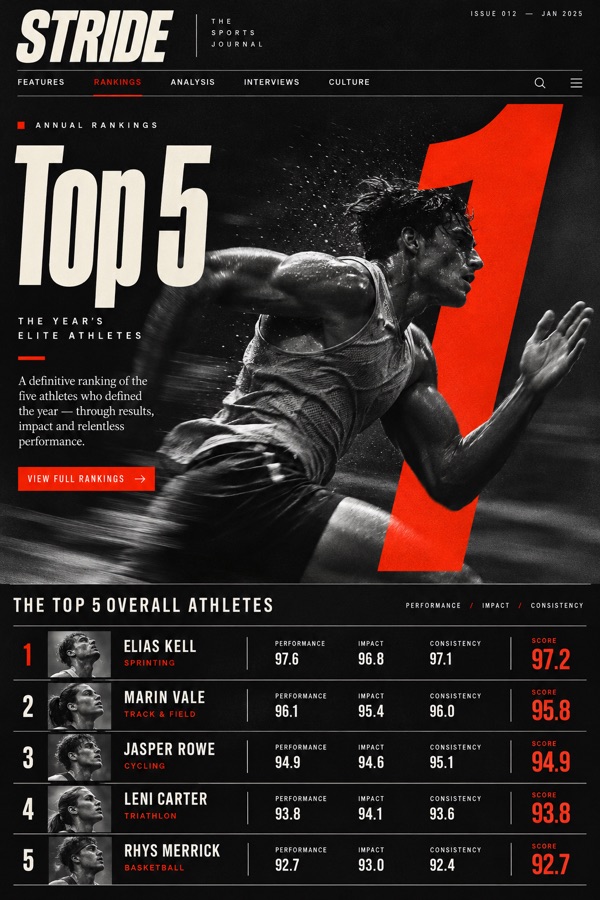
  1. Differential scale: the numeral is 3 to 5 times the body text.
  2. The number is the hierarchy: it organises the content, it does not decorate it.
  3. One accent: colour says which figure to read first.
  4. No chrome around it: no badge, no circle, no card.

Data from Carlos’s library on Nov 8, 2026: 939 references, 20 with a “why” written by him.

9.5out of 10

What we measured

With his own references, the pieces came out better than with any other guide.

With 10 references from his library9.5
With composition notes7–7.5
With someone else’s DESIGN.md4.5–6.5

Test on October 29 and 30, 2026: an infographic and a dashboard, the same tools in every arm, two replicates. One person voted, Carlos, and in the last rounds he knew which version was which. It is a signal, not a study.

Complements, doesn’t replace

Your design tools say what to avoid. Your library says where to go.

design-taste

Checks clichés and generic patterns: the usual heroes, the usual palettes. Keeps the design from looking like everyone else’s.

impeccable

Measures what you see: text sizes, line height, all caps. On the same file it found 18 typography issues where design-taste’s checklist found 0.

Your visual library

Sets the direction: what you saved because you like how it looks, and why. The other two work better with something to aim for.

Use them together: your library sets the direction, design-taste removes the generic, impeccable checks the detail.

Your taste, in everything your AI designs.

Join the waitlist